
Remote MCP servers: how they work and how to connect one
By PostPen Team ·
A remote MCP server is an MCP server that runs as a remote service rather than as a process on your own machine. Your MCP client connects to it at a single URL over the Streamable HTTP transport, and one server can handle multiple client connections. When the server needs sign-in, the MCP specification uses OAuth: you approve access in your browser and the client sends an access token with every request.
This remote MCP server guide sticks to what the MCP specification says, with a link to each page we used.
Start free. Your agent writes, PostPen schedules and publishes.
What a remote MCP server is
MCP lets AI apps connect to external tools through MCP servers. The specification's Architecture page (MCP specification, checked October 23, 2026) lists what servers do, including "Can be local processes or remote services." Its diagram puts servers for files, git and databases on the local machine, and a server for external APIs on the internet.
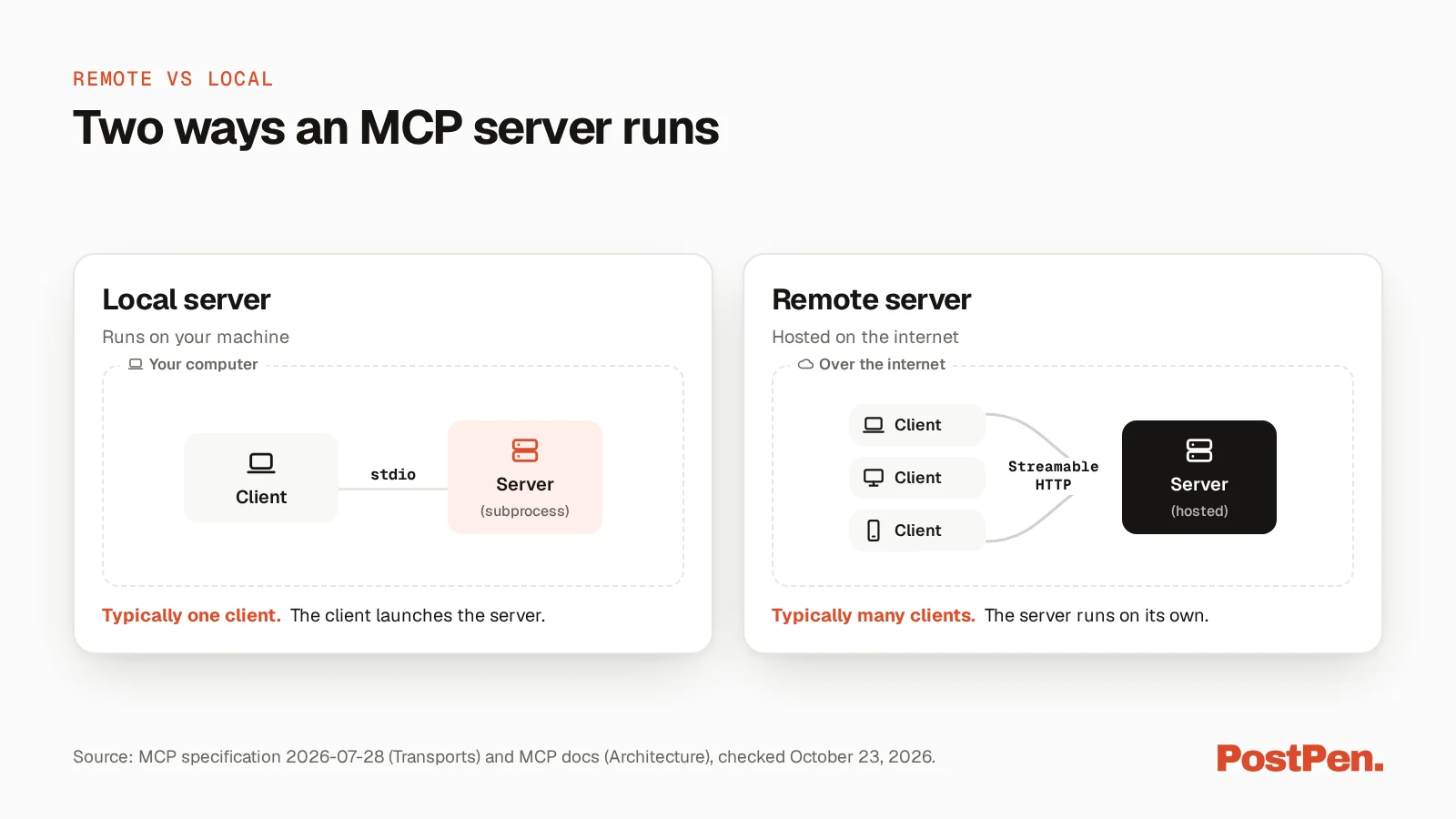
A remote server is the second kind. According to the Streamable HTTP page (MCP specification, checked October 23, 2026), the server "operates as an independent process that can handle multiple client connections."
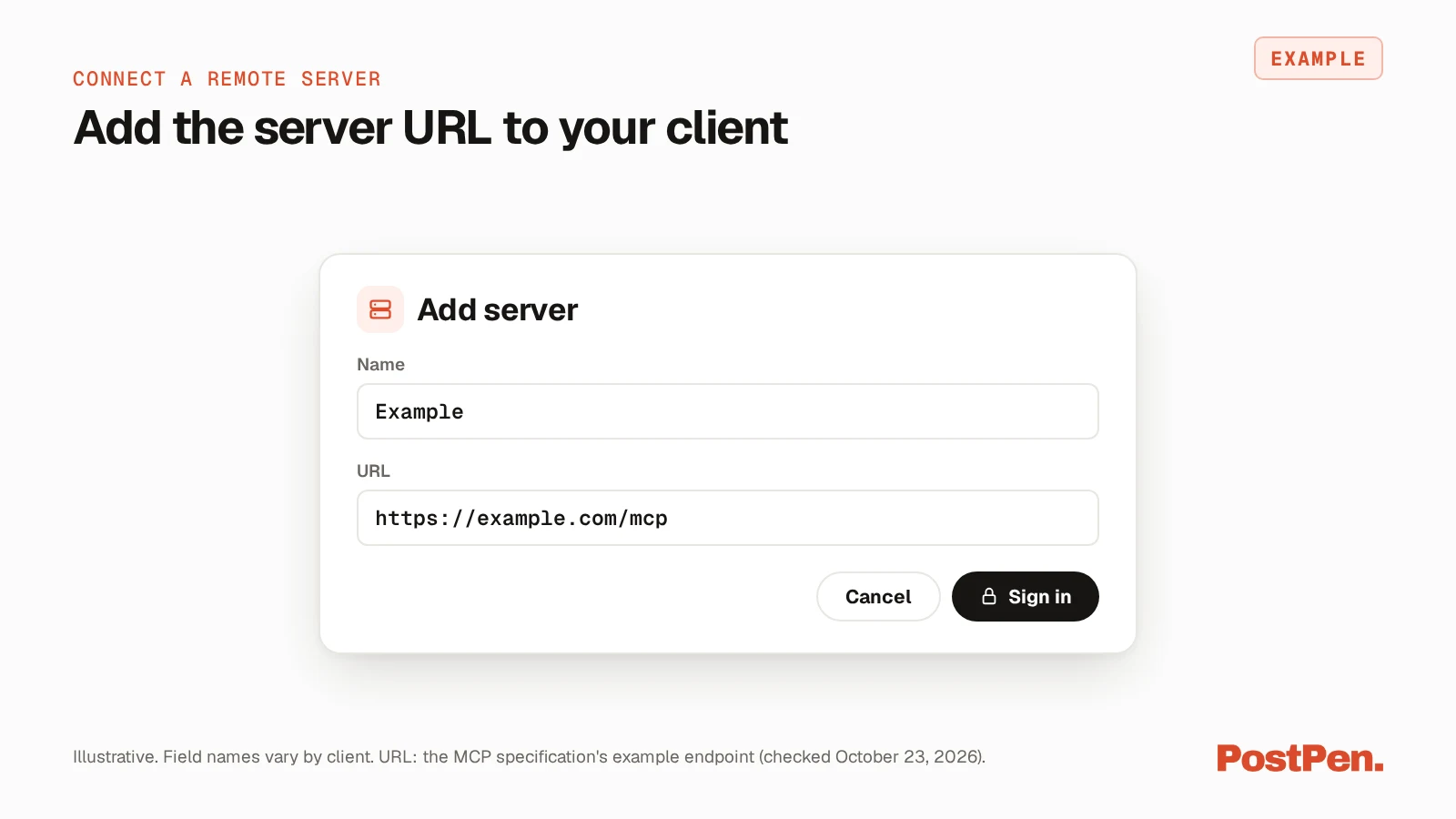
It exposes one URL, called the MCP endpoint. The specification's example is https://example.com/mcp, and that endpoint is the address you give your client.
Remote vs local MCP servers
The Transports overview (MCP specification, checked October 23, 2026) defines two standard transports: stdio and Streamable HTTP. In this guide, a local server uses stdio and a remote server is reached over Streamable HTTP.
| Local server (stdio) | Remote server (Streamable HTTP) | |
|---|---|---|
| Where it runs | On your machine, as a local process | As a remote service your client reaches at a URL |
| Who starts it | Your client launches it as a subprocess | It runs on its own, as an independent process |
| How messages travel | Newline-delimited messages over the subprocess's standard input and output | Each message is an HTTP POST to one MCP endpoint |
| Who it talks to | The client that launched it | Multiple client connections |
| Credentials | Taken from the environment | The OAuth-based authorization flow in the specification, when the server uses it |
The stdio page (MCP specification, checked October 23, 2026) says "the client launches the MCP server as a subprocess." So a stdio server runs on the same machine as your client. A Streamable HTTP server can also run on your own machine, and the safety section below covers that case.
A local server suits files and tools on your own computer, matching the local side of the architecture diagram. A remote server suits hosted services that you sign in to.
How a remote MCP server works
This page follows revision 2026-07-28 of the MCP specification. The Streamable HTTP page sums up the transport: the server "exposes a single HTTP endpoint (the MCP endpoint) that accepts POST," and the client "sends every JSON-RPC request or notification as its own HTTP POST."
For each request, the server answers "with either a single JSON object or a Server-Sent Events (SSE) stream scoped to that request." The Architecture page also calls MCP "a stateless protocol: every request is self-contained and carries its own protocol version and capabilities."
This revision changed the transport in two ways. The Streamable HTTP page lists the "Removal of the GET stream endpoint" and the "Removal of protocol-level sessions."
The older HTTP+SSE transport is on the specification's Deprecated Features list (MCP specification, checked October 23, 2026), with Streamable HTTP as its migration path. New remote servers should use Streamable HTTP.
How sign-in works on a remote server
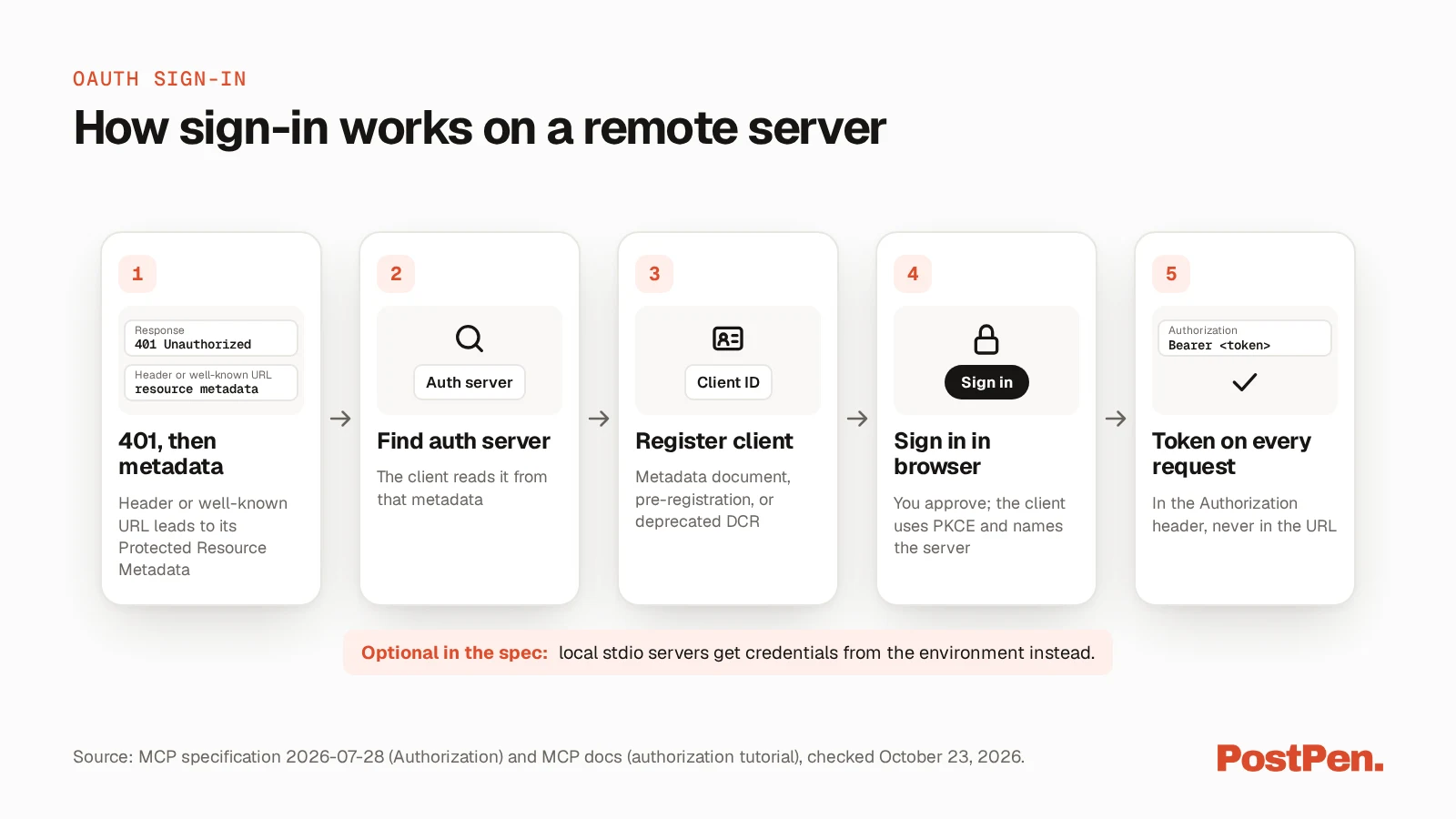
The Authorization page (MCP specification, checked October 23, 2026) bases sign-in on OAuth 2.1, with the MCP server acting as an OAuth resource server. Here's the flow it describes, in plain words.
- Your client calls the server without a token and gets
401 Unauthorized. Per Authorization Server Discovery (MCP specification, checked October 23, 2026), the server can put a link to its Protected Resource Metadata in theWWW-Authenticateheader, or serve that document at a well-known URL. - The client reads that metadata document, which lists at least one authorization server, and looks up that authorization server's details.
- The client registers. Client Registration (MCP specification, checked October 23, 2026) lists three ways: Client ID Metadata Documents, pre-registration or Dynamic Client Registration, which is now deprecated.
- Your browser opens, and you sign in and approve access. The client uses PKCE and includes a resource parameter that names the MCP server it wants a token for.
- The client sends the access token in the
Authorizationheader on every request. The Authorization page says access tokens "MUST NOT be included in the URI query string."
The same page says "Authorization is OPTIONAL for MCP implementations." Implementations using stdio should not follow this flow and instead "retrieve credentials from the environment."
How to connect a remote MCP server
The exact screens differ by client, so check your client's docs for where the setting goes. For Claude, see how to add an MCP server in Claude. In general:
- Get the server's MCP endpoint URL from the provider and use it exactly as given. The specification's example is
https://example.com/mcp, but don't add or change a path yourself. - Add it in your MCP client as a remote or HTTP server, using that URL.
- If the server needs sign-in, your client opens your browser. Sign in and approve the access it asks for.
- Check the tools the server offers, and approve tool calls as your client asks you to.
On the last step, the specification's overview (MCP specification, checked October 23, 2026) says "Hosts must obtain explicit user consent before invoking any tool." It adds that "Users should understand what each tool does before authorizing its use."
Before you connect a remote server
These points come from the specification pages above.
- Connect only to servers you trust. The overview says tool descriptions "should be considered untrusted, unless obtained from a trusted server."
- Read the approval prompts. Your client should ask before it runs a tool, so take a moment to check what each call will do.
- Tokens stay with the server they were issued for. The Authorization page says servers "MUST validate that access tokens were issued specifically for them" and "MUST NOT accept or transit any other tokens." Authorization Security Considerations (MCP specification, checked October 23, 2026) says token passthrough is "explicitly forbidden."
- Servers check where requests come from. Per the Streamable HTTP page, servers "MUST validate the Origin header on all incoming connections" and "SHOULD implement proper authentication for all connections." A Streamable HTTP server running locally should bind only to 127.0.0.1.
MCP server examples
The MCP project keeps a small set of reference servers in its servers repository (MCP servers repository, checked October 23, 2026). They include:
- a test server with prompts, resources and tools
- a web fetch server that fetches web content and converts it for a model to use
- a file system server for file operations with configurable access controls
- a git server with tools to read, search and change git repositories
- a memory server that keeps a knowledge graph
- a step-by-step thinking server for working through problems in sequences of thoughts
- a time server for time and time zone conversion
The repository says they can be started with npx or uvx, so they run locally. It also describes them as "educational examples for developers building their own MCP servers, not as production-ready solutions."
For a remote server, you connect to the URL of the provider's MCP endpoint instead. For servers built for social media, see our guide to social media MCP servers.
Example: a posting server
For example, PostPen runs a remote MCP server for LinkedIn posting at https://mcp.postpen.ai, entered as written with no /mcp added. Your agent opens a browser, you sign in to PostPen and click Allow, and then your agent writes while PostPen schedules and publishes.
For setup, see the setup guide for your agent. To see what your agent can do once it's connected, see PostPen's agent tools.
FAQ
It's an MCP server that runs as a remote service rather than as a process on your own machine. Your MCP client connects to it at a single URL over the Streamable HTTP transport.
A local server runs on your machine as a process your client starts, and the two talk over stdio. A remote server runs on its own, is reached over Streamable HTTP and can handle multiple client connections.
Authorization is optional in the MCP specification. When a remote server uses it, it follows OAuth 2.1: you approve access in your browser, and the client sends an access token with every request.
It's deprecated. The MCP specification replaced it with Streamable HTTP, so new remote servers should use Streamable HTTP.
The MCP project's reference servers include a test server, a web fetch server, a file system server, a git server, a memory server, a step-by-step thinking server and a time server, which you run locally. For a remote server, the provider gives you the URL of its MCP endpoint.
Connect a remote server you trust
A remote MCP server comes down to one URL, Streamable HTTP and, when it needs it, an OAuth sign-in in your browser. Check what each tool does before you approve it.
Start free. Your agent writes, PostPen schedules and publishes.