
Social media MCP servers: what they do and how to pick one
By PostPen Team ·
A social media MCP server gives an AI agent tools to draft, schedule, publish or read stats on social accounts, so you can manage posts from a chat. They come in three kinds: hosted services you connect with a URL, open-source servers you run yourself, and analytics-only servers that read but don't post. Before you connect one, check which networks and account types it supports, whether publishing needs your confirm, and whether the agent ever sees your account tokens.
Start free if LinkedIn is the network you care about. Your agent writes the post, and PostPen schedules and publishes it.
This guide doesn't rank anything. It explains the three kinds of server, gives you seven things to check, and lists a few servers using only what their own pages say.
What a social media MCP server does
MCP, the Model Context Protocol, is an open standard for connecting AI agents to outside tools and data. A server publishes a list of tools. Your agent reads that list and calls a tool when your request needs it.
A social media MCP server wraps one or more social networks in those tools. Typical ones list your connected accounts, save a draft, schedule a post, publish now, read post stats and read comments. The exact set, and what each tool is allowed to do, differs from server to server.
You ask in plain words, such as "schedule this for Thursday at 9 AM." The agent picks the tool and fills in the details. The server talks to the network, so your agent doesn't need to know each platform's API.
The three kinds you'll find
Most servers fall into one of three groups. Some vendors offer more than one, such as a hosted endpoint plus an open-source edition.
| Kind | Who runs it | Good for | Watch for |
|---|---|---|---|
| Hosted | The vendor. You connect with a URL and sign in with OAuth or an API key. | Getting started in minutes with no server to maintain | Which networks and account types your plan includes, and how the vendor stores your connections |
| Open source / self-hosted | You. You install it, keep it updated and often register your own developer app on each platform. | Full control over data, code and where it runs | Upkeep, platform app approvals, and keeping it running so scheduled posts go out |
| Analytics-only | Either the vendor or you | Reading stats, comments and trends without any risk of posting | It reads data but doesn't publish, so you need another route for posting |
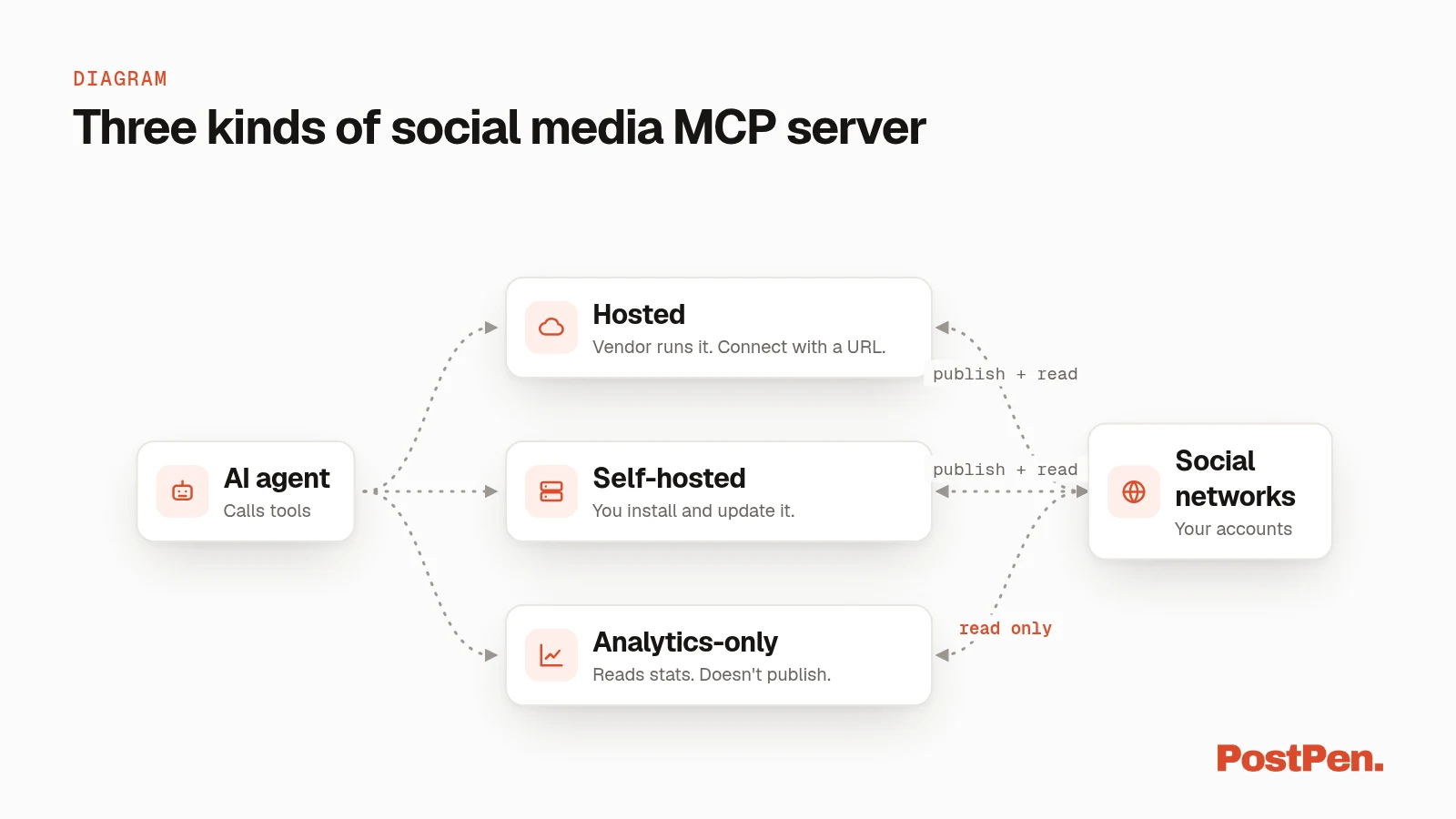
An open source social media MCP server can be a good fit if you already run your own infrastructure. A hosted one suits you if you'd rather spend that time on the posts.
What to check before you connect one
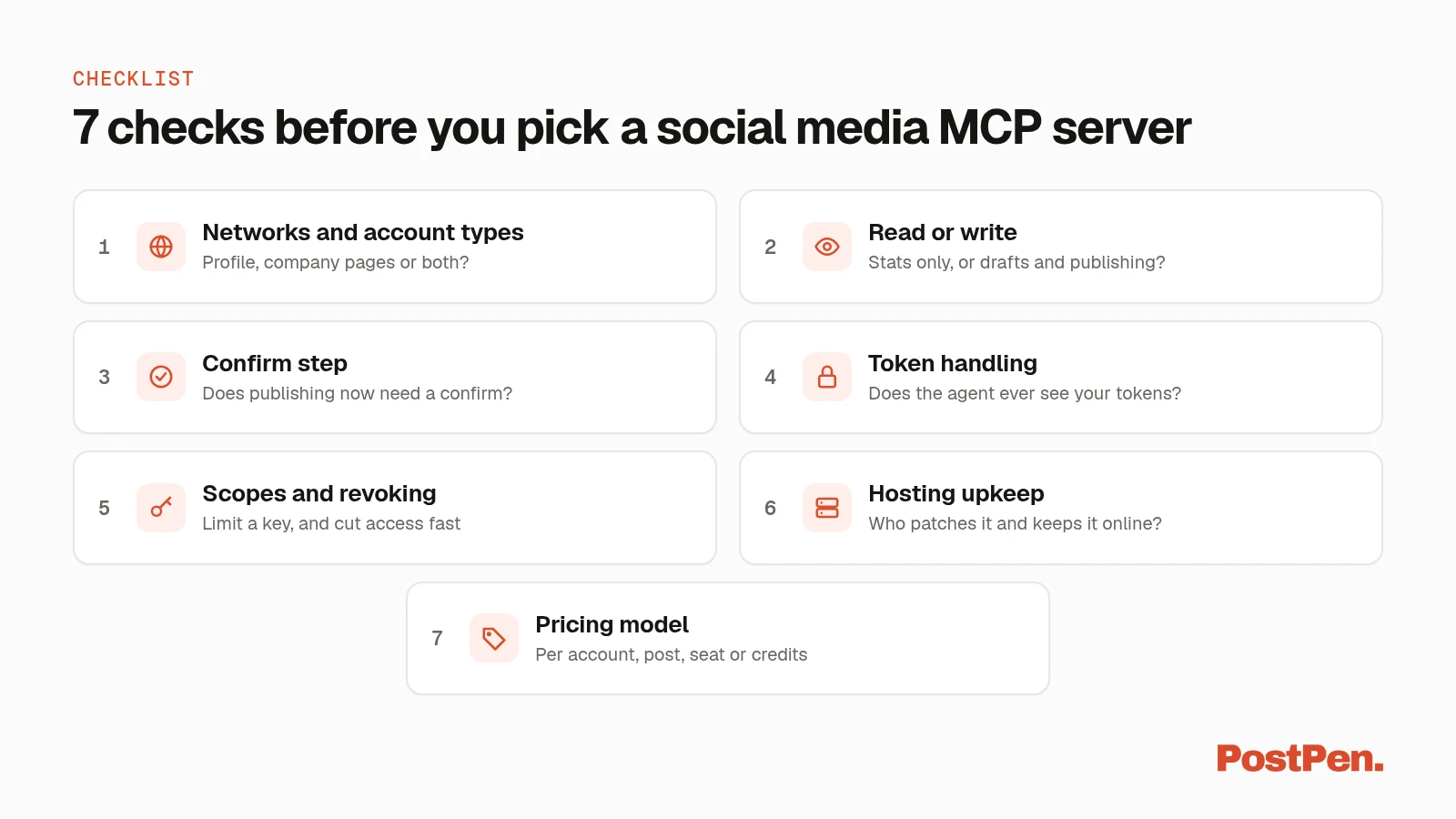
Use this list on any social media MCP server, including ours.
- Networks and account types. "LinkedIn" can mean a personal profile, company pages or both. Check the exact account types listed, not just the logos.
- Read or write. Some servers only read stats and comments. Others can create drafts, schedule and publish. Know which one you're adding.
- A confirm step for publishing now. Check whether an immediate publish needs an explicit confirm, and whether everything else lands somewhere you can review first, like a calendar or an approval queue.
- Token handling. Find out whether your agent ever sees your social account tokens, or whether the server holds them. Our checklist for letting an AI agent post on LinkedIn covers this and the confirm step in more detail.
- Scopes and revoking access. Look for scopes that limit what a key can do, and a clear way to cut access: remove the connector, revoke the key or disconnect the account.
- Hosted or self-hosted upkeep. A self-hosted server is yours to patch, back up and keep online. A hosted one is maintained for you on the vendor's infrastructure.
- Pricing model. Pricing can be per connected account, per post, per seat or credit-based, and some servers come only with certain plans. Match the model to how you post, and check the vendor's current pricing page.
Some social media MCP servers, by their own docs (checked October 12, 2026)
Each row below uses only what that server's own page said on October 12, 2026. The order is alphabetical, not a ranking.
| Server | Hosted / open source | Networks (as stated) | Notes from their page | Source |
|---|---|---|---|---|
| Chirpie | Hosted, plus a local @chirpie/mcp package | X, Bluesky, LinkedIn, Threads, Mastodon, Instagram, Facebook and Telegram | Connect with the URL https://chirpie.ai/mcp and sign in. Its tool list shows connecting LinkedIn Pages as "Coming Soon". | chirpie.ai/docs/mcp |
| Outstand | Hosted | "12 social platforms", including X, LinkedIn, Instagram, Facebook, Threads, TikTok, YouTube, Bluesky, Pinterest, Google Business, Vimeo and Reddit | "28 tools". Endpoint https://mcp.outstand.so/mcp; one-click OAuth or an API key. | outstand.so/mcp |
| pendpost | Open source (MIT), local-first | Instagram, Facebook, LinkedIn, YouTube, X, Telegram, Discord, Mastodon, Nostr, WordPress and Ghost, with more in beta | "Nothing goes live until a human approves it." Runs locally with npx pendpost. | github.com/pendpost/pendpost |
| PostPen | Hosted | LinkedIn only: personal profile and company pages | 11 tools. publish_now is refused unless confirm is true; no tool accepts or returns a LinkedIn token. | postpen.ai/agent-tools |
| Postiz | Open source (AGPL-3.0) to self-host, or Postiz Cloud | Listed under "Schedule posts to" in its README (not counted here) | Hosted MCP endpoint on Cloud; on self-hosted, "you point the MCP / CLI at your own instance". | github.com/gitroomhq/postiz-app |
| Preflight | Hosted | "Twelve networks" | 27 tools, 15 of them read-only. Publishing now needs confirmPublishNow. Comes with the Pro and Studio plans. | preflight.social/docs/mcp |
Tool counts and plans change; check each vendor's page.
If LinkedIn is the network that matters: PostPen
PostPen is LinkedIn-only. It doesn't post to X, Instagram, Facebook or any other network.
Your agent writes the post. PostPen schedules and publishes it to your LinkedIn profile and the company pages you admin, from one LinkedIn login. Its MCP server is at https://mcp.postpen.ai, and the HTTP API covers bots that don't speak MCP.
It has 11 tools, listed on the agent tools page. publish_now is refused unless confirm is true, everything else lands on one calendar you can review, and the agent never sees your LinkedIn token. Step-by-step setup for each agent is in our LinkedIn MCP guide, and plans are on the pricing page.
FAQ
A server that gives an AI agent tools to draft, schedule, publish or read stats on social accounts using the Model Context Protocol.
It depends on the server. Each one lists the networks and account types it supports, so check that before you connect it.
Check whether publishing needs your confirm and whether the agent can see your account tokens. With PostPen, publish_now is refused unless confirm is true, and no tool accepts or returns a LinkedIn token.
Hosted servers connect with a URL and are maintained for you. Open-source servers give you control, but you run and update them yourself.
No. PostPen schedules and publishes to LinkedIn personal profiles and company pages only.
Pick the server that fits your networks
Start with the networks and account types you actually post to, then run the seven checks. If LinkedIn is the one that matters, start free and let your agent hand PostPen the posts.