
What are impressions on LinkedIn?
By PostPen Team ·
Impressions on LinkedIn are the number of times your post was displayed on screen. If one person sees your post three times, that counts as three impressions. Members reached counts that person once, because it shows how many distinct members and Pages saw the post.
LinkedIn notes both numbers are estimates. This guide covers what counts as an impression, how it differs from members reached, and where to find the number.
Start free if you want your AI agent to read these numbers for you. Your agent writes the post, and PostPen schedules and publishes it.
What counts as an impression
LinkedIn defines impressions as "the number of times your post was displayed on screen" in Combined post analytics (LinkedIn Help, checked October 16, 2026). Recent changes to viewers demographics (LinkedIn Help, checked October 16, 2026) uses the same wording.
Three points follow from LinkedIn's definitions:
- Every display counts. An impression is a display, not a person, so repeat views by the same member add more impressions.
- The number is an estimate. Combined post analytics says impressions are "an estimate and may not be precise." Post analytics for your content (LinkedIn Help, checked October 16, 2026) says the same about all the numbers in your post analytics.
- Your own views count. View post analytics for your content (LinkedIn Help, checked October 16, 2026) says "Your own views, social engagements, link engagements, saves, and sends are counted towards the analytics of your content."
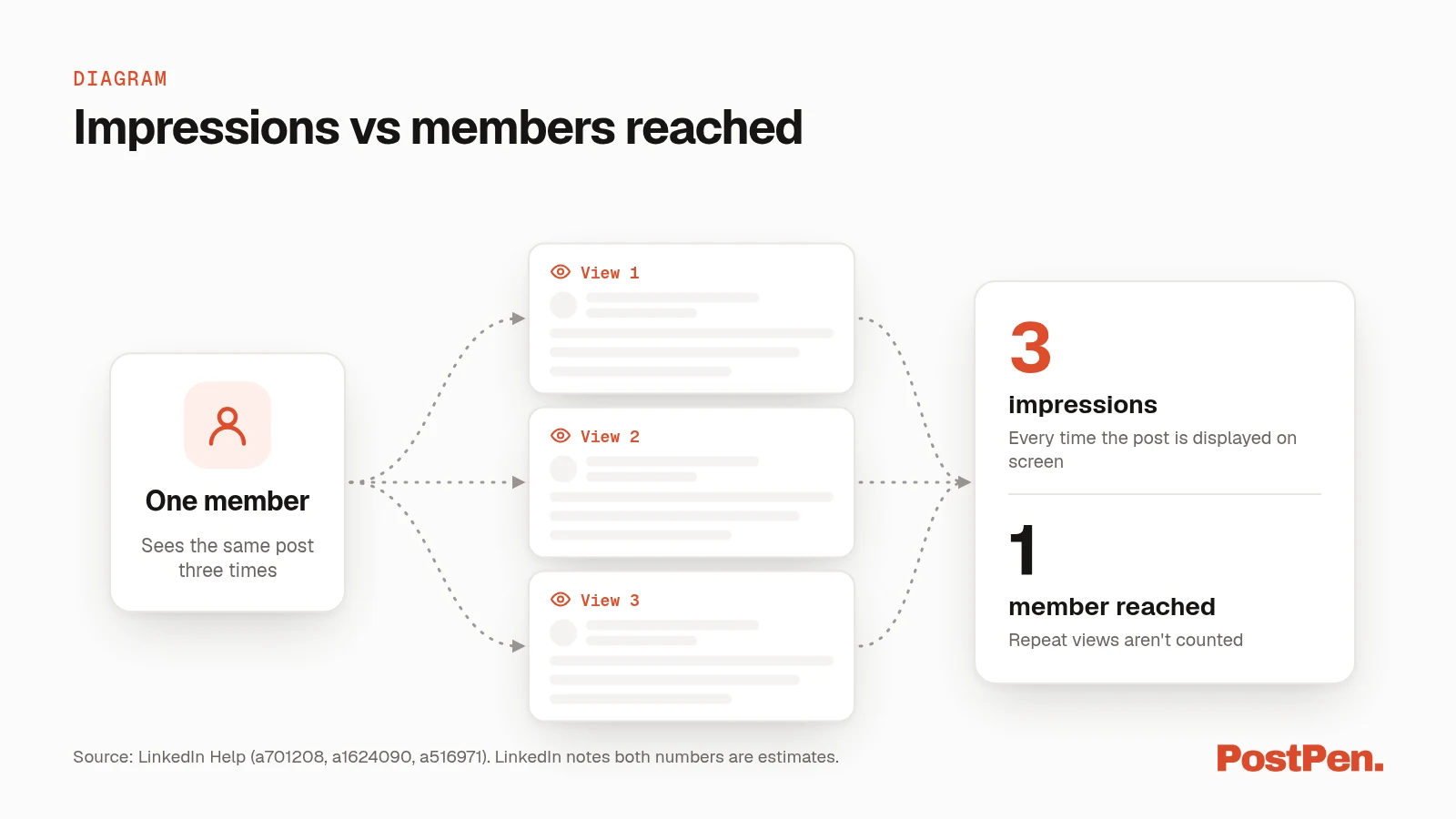
Impressions vs members reached
These two numbers sit next to each other in your analytics, and they answer different questions. Impressions tell you how often the post was shown. Members reached tells you how many distinct people and Pages saw it.
| Metric | What it counts | Repeat views | Source (checked October 16, 2026) |
|---|---|---|---|
| Impressions | Times your post was displayed on screen | Counted every time | a701208, a1624090 |
| Members reached | Distinct members and Pages that saw your post | Not counted | a516971, a701208 |
Here is the one-person example. A member scrolls past your post in the morning, sees it again at lunch and opens it from a notification in the evening. That adds three impressions and one member reached.
LinkedIn puts it this way in a1624090: members reached is "the number of members your post was displayed to at least once." Post analytics for your content adds that members reached "is an estimate and does not include repeat views."
In network and out of network
Your impressions are split into two percentages. Per Combined post analytics (LinkedIn Help, checked October 16, 2026):
- In network is the "percentage of impressions from members who follow or are connected to you."
- Out of network is the "percentage of impressions from members who don't follow or aren't connected to you."
The two parts describe where your impressions came from. They don't change what an impression is.
Where to find your impressions
LinkedIn shows impressions in three places, depending on whether you want one post, all your posts or a company page.
One post. Click the impressions count in the lower-left corner of your post, or View analytics in the lower-right corner. Your posts are under Me, then Posts & Activity, per View post analytics for your content (LinkedIn Help, checked October 16, 2026).
All your posts. Combined post analytics (LinkedIn Help, checked October 16, 2026) shows total impressions across all your content. It lives in Analytics & tools, on the Posts tab.
Company pages. Page admins see impressions in the Page's content analytics, per Content analytics for your LinkedIn Page (LinkedIn Help, checked October 16, 2026). For Page posts, that page counts an impression when the post is "at least 50 percent on the screen for 300 milliseconds or more, or when it's clicked."
For every other metric, from reactions to saves, see our full LinkedIn post analytics guide.
Comment impressions
Comments have their own impression count. Per View analytics for your comments (LinkedIn Help, checked October 16, 2026), it works like this:
- Non-unique. "If the same member views a comment twice, it is counted as two comment impressions."
- Your own views count. LinkedIn says your own views are counted toward the comment impression count.
- Private to you. Only you can see the impressions on your comments, and they show as part of the comment itself.
- No dashboard. Comment impressions are not shown in any dashboard.
Page admins see the impression count of every comment made as the Page.
How your AI agent can read impressions
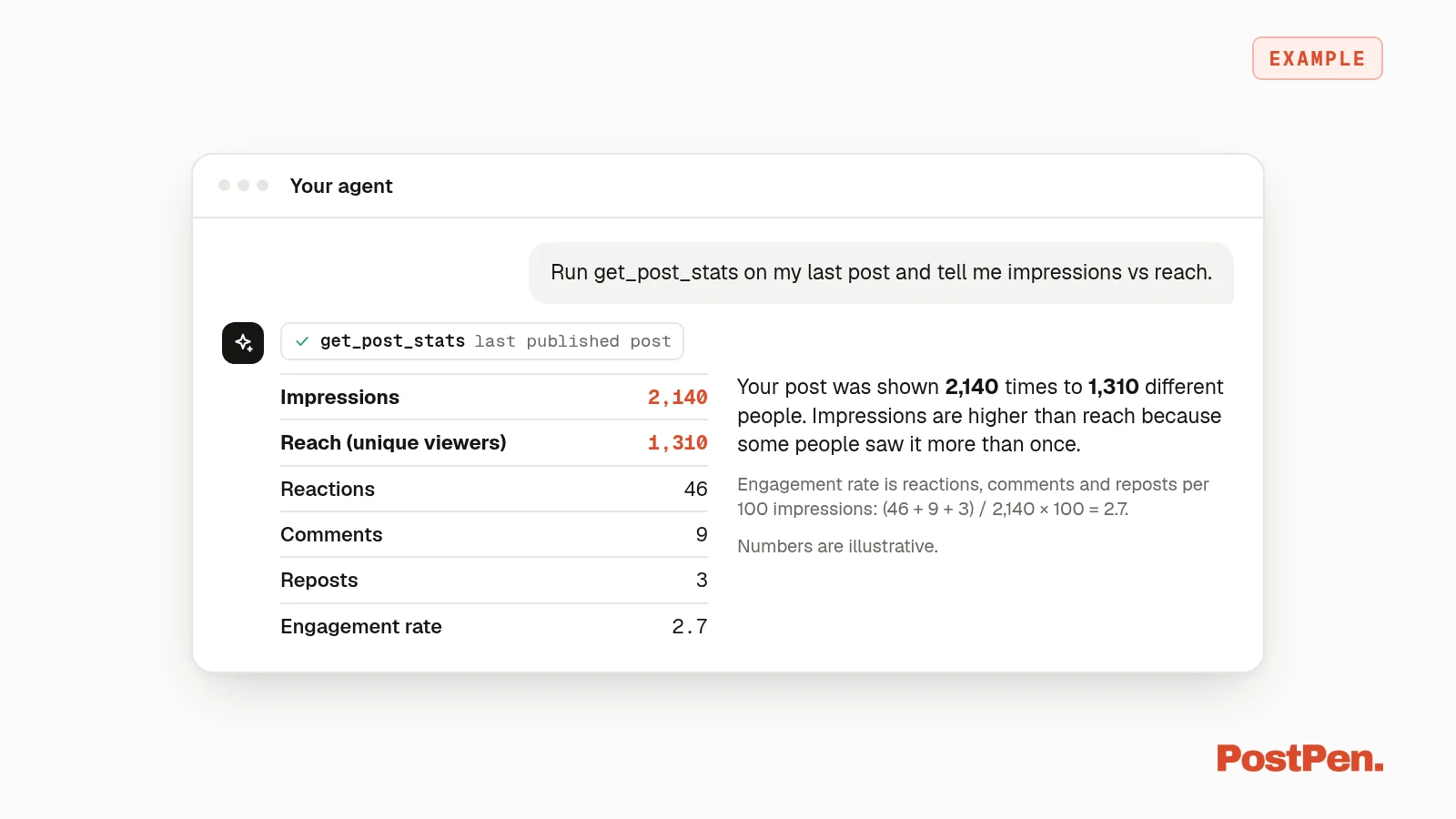
If your agent is connected to PostPen, it can read your numbers without you opening LinkedIn. get_post_stats returns one published post's impressions, reach (unique viewers), reactions, comments, reposts and engagement rate. Engagement rate is reactions, comments and reposts per 100 impressions, and it stays empty until a post has 100 impressions.
get_insights compares the last N days with the period before, so your agent can tell you whether impressions went up or down. Ask in plain words:
Run get_post_stats on my last post and tell me impressions vs reach.
See the full list of agent tools, or how the agent planning loop works in the LinkedIn post analytics guide.
FAQ
One impression is one time your post is displayed on screen. Repeat views by the same person count again.
Impressions count every display. Members reached counts each distinct member or Page once.
LinkedIn says the numbers are estimates and may not be precise.
Yes. LinkedIn Help says your own views count toward the analytics of your posts, and toward the impression count on your comments.
Yes, through PostPen. get_post_stats returns a published post's impressions and reach.
Let your agent check the numbers
Impressions count displays, members reached counts people, and both are estimates. If you'd rather ask your agent than click through analytics, connect it to PostPen through the LinkedIn MCP server.
Start free. Your agent writes the post, and PostPen schedules and publishes it.